On 30 September 2026 Microsoft announced the retirement of the Dv3, Dsv3, Ev3 and Esv3 series. All 32 sizes end on 15 November 2029. After that they can neither be created nor run, and remaining VMs are deallocated.
Dv3 and Ev3 have been available since 2017 and are part of many established environments. The date seems far away. The restrictions that affect operations today, however, have applied since July 2026.
What has applied since July 2026
Retirement is the final step. Before it, restrictions apply that Microsoft introduced for a number of older series, including Bv1, Dv2 and Fsv2.
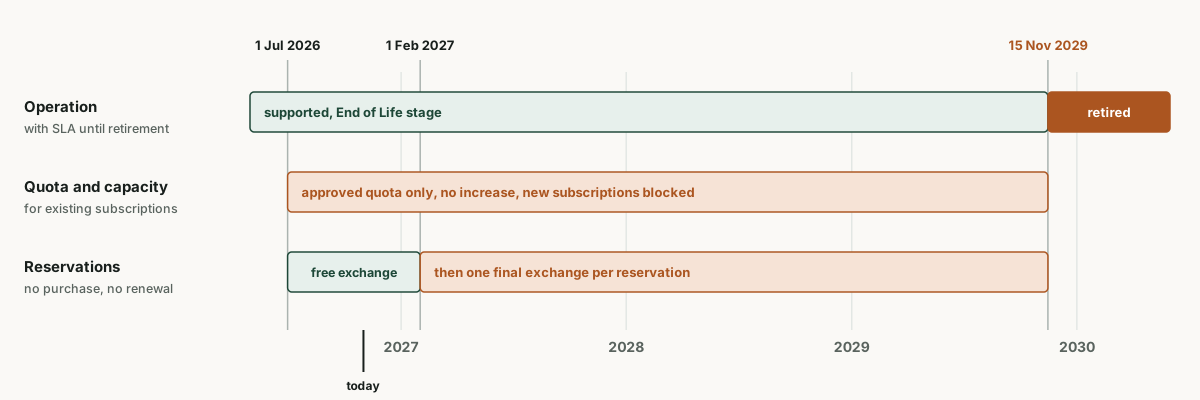
- New subscriptions cannot deploy these series.
- Existing subscriptions can keep deploying within their approved quota as long as the region has capacity. Microsoft does not approve additional quota.
- Since 1 July 2026, one-year and three-year reservations can neither be purchased nor renewed. Existing ones remain valid until the end of their term.
- Until 1 February 2027 reservations can be exchanged freely. After that, each eligible reservation keeps one final exchange.
More on this: Bv1 reservations: questions and answers for finance and FinOps
Quota is not capacity
In day-to-day operations this point matters more than the 2029 date. Quota is an approved limit, not a commitment. Deallocating and restarting a Dsv3 VM, scaling out a scale set or recovering in another zone after an outage can hit an allocation failure even though quota is sufficient.
A reservation does not change that. It is a discount and does not reserve capacity. Only an on-demand capacity reservation for a specific size, region and zone secures capacity. New capacity reservations for these series remain possible as long as quota allows. If several subscriptions share such a reservation, however, the consuming subscription needs its own quota, and that is no longer increased.
Recovery plans that start Dsv3 or Esv3 VMs in a second region in an emergency should therefore be reviewed now rather than in 2029.
Where to migrate and what it costs
Microsoft recommends Dv5, Dv6 or Dv7 for the D series and Ev5, Esv6 or Esv7 for the E series. Microsoft calls v5 the smoothest transition, the series supports generation 1 and 2. v6 and v7 require generation 2, NVMe disks and the MANA network adapter. For those, Microsoft explicitly advises against a direct in-place resize and recommends an updated image.
For cost, one letter matters most: the d in the name. It stands for a local temporary disk. Dsv3 and Esv3 have one, Dsv5 and Esv5 do not.
| Size with 4 vCPU | Temporary disk | Linux per month | Compared to v3 |
|---|---|---|---|
| D4s_v3 | yes | 175.20 USD | baseline |
| D4s_v5 (Intel) | no | 167.90 USD | 4.2 % cheaper |
| D4as_v5 (AMD) | no | 151.84 USD | 13.3 % cheaper |
| D4ds_v5 (Intel) | yes | 198.56 USD | 13.3 % more |
| D4ads_v5 (AMD) | yes | 182.50 USD | 4.2 % more |
| D4ds_v6 (Intel) | yes | 217.54 USD | 24.2 % more |
| E4s_v3 | yes | 233.60 USD | baseline |
| E4s_v5 (Intel) | no | 221.92 USD | 5.0 % cheaper |
| E4as_v5 (AMD) | no | 200.02 USD | 14.4 % cheaper |
| E4ds_v5 (Intel) | yes | 252.58 USD | 8.1 % more |
| E4ads_v5 (AMD) | yes | 230.68 USD | 1.3 % cheaper |
US list prices for Linux pay-as-you-go in West Europe, retrieved on 1 Nov 2026 through the Azure Retail Prices API, calculated with 730 hours. For Windows, the licence comes on top. In Austria East the price list contains no v3 sizes.
If you do not need the temporary disk, the move saves money. If you do, the D series costs 13 percent more than today on Intel and 4 percent more on AMD. In the E series, the AMD variant with temporary disk is even slightly cheaper than Esv3. Whether a smaller size would also do only becomes clear from measured utilisation.
What to watch when resizing
- With a d in the name, the temporary disk is kept. The resize is then possible directly, on Windows too.
- Without a d, the same applies as for Bv1. Linux allows the change if neither swap nor application data lives on the temporary disk. Windows rejects it, there the path goes through a snapshot and a new VM.
- For Dv5, Dsv5, Ddv5 and Ddsv5, Microsoft requires Accelerated Networking. It must be enabled before the resize.
- A resize restarts the VM. For scale sets and clusters it belongs in a maintenance window.
- Reservations do not move automatically. Decide before the change whether to exchange or trade in for a savings plan. Otherwise the new VM runs at list price while the old reservation finds no matching usage.
More on this: Replacing Bv1: a six-step runbook
Finding affected VMs
This Azure Resource Graph query counts VMs and scale sets of the four series by size, region and subscription.
resources
| where type in~ ('microsoft.compute/virtualmachines', 'microsoft.compute/virtualmachinescalesets')
| extend size = iff(type =~ 'microsoft.compute/virtualmachines',
    tostring(properties.hardwareProfile.vmSize), tostring(sku.name))
| where size matches regex @'(?i)^standard_[de][0-9]+(-[0-9]+)?i?s?_v3$'
| summarize total = count() by type, size, location, subscriptionId
| order by total desc
For scale sets the query counts the scale set, not the instances. Add operating system, reservation coverage and ownership to the list before choosing target sizes.
To settle before 1 February 2027
- Which reservations cover v3 and when they end. Until 1 February 2027 exchanges are free, after that one remains.
- Which VMs actually use the temporary disk, for example for the page file, tempdb or caches. Target size and price depend on it.
- Which recovery and scaling plans rely on v3 capacity.
- Whether new builds with a current image can go straight to v6 or v7. v5 is already in the Extended stage, v6 and v7 in the Current stage.
Setting the target size per VM
The right target size per VM depends on utilisation, temporary disk, operating system and active reservations. The cost and migration analysis maps this for your subscriptions and defines what should happen to the reservations before 1 February 2027. The resizing itself is done by your team.
More on this: Azure cost: what a FinOps review typically finds
All dates at a glance: Azure deadline calendar 2026 to 2029
Frequently asked questions
Do Dv3 VMs keep running without restrictions until 2029?
Existing VMs run with SLA until 15 November 2029. New deployments are only possible within existing quota and when capacity is available, and new subscriptions are excluded.
Can I still buy reservations for Dsv3 or Esv3?
No. Since 1 July 2026, one-year and three-year reservations for Dv3, Dsv3, Ev3 and Esv3 can neither be purchased nor renewed. Microsoft recommends a trade-in for a savings plan or an exchange for reservations on newer series.
What happens to remaining VMs on 15 November 2029?
According to Microsoft they are deallocated, stop working and lose their SLA. The announcement states that such VMs may ultimately be deleted.
Which successor series is the cheapest?
In West Europe, Dasv5 and Easv5 without temporary disk are the cheapest, about 13 to 14 percent below v3. With a temporary disk, the AMD variant is the cheaper one in both series.
Sources (as of 1 November 2026)
- Azure Update 572346: retirement of the Dv3, Dsv3, Ev3 and Esv3 series (30 Sep 2026)
- Microsoft Learn: VM size series retirements, capacity growth restrictions, and modernization guidance
- Azure Update 560948: end of Reserved VM Instances for selected series from 1 July 2026
- Microsoft Learn: Modernize to the v5 VM series
- Microsoft Learn: Modernize to the v6 and v7 VM series
- Microsoft Learn: On-demand capacity reservation
- Microsoft Learn: FAQ Azure VM sizes with no local temporary disk
- Microsoft: Azure Retail Prices API, West Europe list prices retrieved 1 Nov 2026