Since 9 November 2026, every Arc-enabled Windows Server has its own Azure File Sync page in the Azure portal. Agent, registration and sync setup run there in one flow. Until now, registration at least had to run on the server itself, through the wizard or PowerShell. The new page is marked as preview.
For companies with a classic file server in their own server room, this is a convenient way in. The server stays, drive mappings and permissions stay, and Azure Files holds a complete copy. Convenient does not mean free, though, nor a fit for every kind of data.
What changes on the file server and what does not
Azure File Sync turns the Windows Server into a cache of a file share in Azure Files. Users keep connecting to the server over SMB, and NTFS permissions are preserved. With cloud tiering, frequently used files stay local while rarely used ones live only in Azure. When opened, the server recalls them.
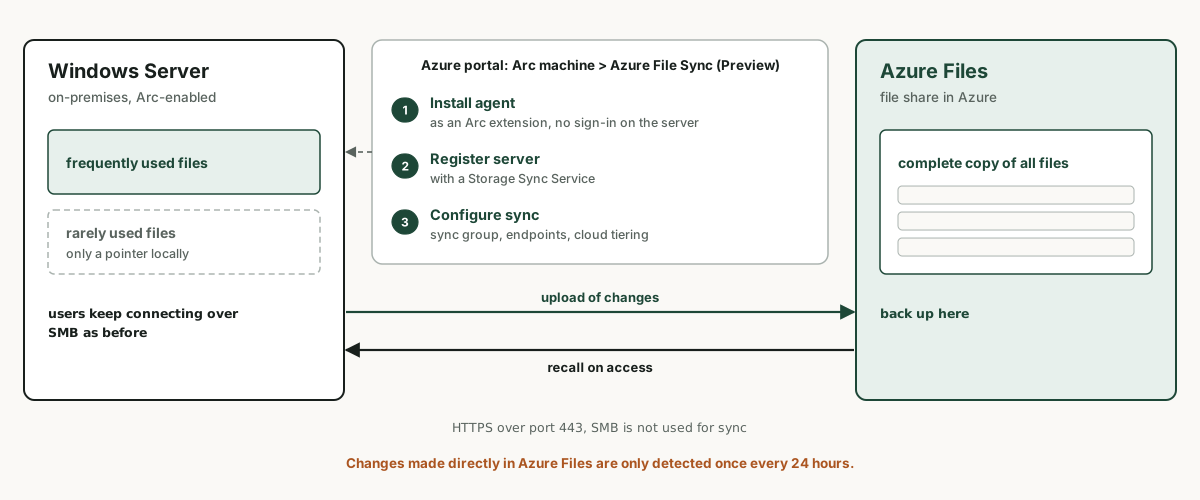
The page sits in the portal under Azure Arc, Machines, on the server under Windows management. It installs the agent as the "Azure File Sync Agent for Windows" extension, registers the server with an existing or new Storage Sync Service and then leads on to sync group, endpoints and cloud tiering. The extension has existed since agent version 21.2 from July 2025. What is new is that all three steps sit in one place.
What it costs per month
| Item | Price | What drives it |
|---|---|---|
| Synced server | 5 USD per server per month | discounted with Software Assurance through Azure Arc |
| File share in Azure Files | by billing model and redundancy | Microsoft recommends provisioned v2 for new shares |
| Recall from Azure | transactions and egress | rises when antivirus, backup or classification tools read tiered files |
Three sites with one file server each therefore come to 15 US dollars a month in server fees. What usually decides the bill is the size of the share and how often tiered files are recalled.
The Software Assurance discount is not automatic
Azure File Sync is one of the services included in Windows Server Management enabled by Azure Arc. Since January 2026, Arc-enabled servers with Software Assurance get a discounted per-server price, provided the agent is at least version 22.
Connecting the server to Arc is not enough. Microsoft requires an explicit attestation per server, in the portal under Azure Arc, Licenses, Azure Benefits Windows Server, or licensing through Windows Server pay-as-you-go. Without that step, the benefit does not apply.
The documentation does not state the size of the discount. The overview speaks of discounted per-server pricing, while the billing section lists Azure File Sync among the services at no extra cost beyond networking and storage. Only the invoice for the first full month gives a reliable answer.
Check agent versions first
If you already run Azure File Sync, look at agent versions before anything else. Version 20 expired on 29 October 2026, and Microsoft blocks expired agents from connecting to the service. The current release is 23.1 from 1 September 2026, and the discount needs at least version 22.
Get-AzStorageSyncService | ForEach-Object {
  Get-AzStorageSyncServer -ParentObject $_ |
    Select-Object FriendlyName, AgentVersion, AgentVersionStatus,
      AgentVersionExpirationDate, LastHeartBeat
} | Sort-Object AgentVersionExpirationDate | Format-Table
The agent can update itself, either shortly before expiry or as soon as a new version ships. According to Microsoft, the immediate option does not apply to servers in a failover cluster. Those need Microsoft Update or a scheduled window.
Where File Sync fits and where it does not
- Fits: file servers in branch offices, full disks that cloud tiering relieves, and replacing DFS-R between sites.
- Does not fit: databases and file-based applications that open shared data files. Microsoft advises against it because database and log files can drift apart.
- NTFS only. ReFS volumes are not supported, and the system volume cannot use cloud tiering.
- Windows Server 2016 to 2025 only. Arc-enabled Linux servers and NAS shares are ruled out as a source.
- The storage account must allow account key access and sit in the same region as the Storage Sync Service.
Adjust backup and antivirus
With cloud tiering, only part of the files remains on the server. A server backup then either skips tiered files or recalls them and causes egress charges. Microsoft recommends backing up the share in Azure, for example with Azure Backup. Restoring a whole VM or a bare-metal image is not supported while cloud tiering is enabled.
Antivirus software should skip files carrying the attribute for tiered content. Microsoft Defender does so for scheduled scans but not for real-time protection. For third-party products, ask the vendor before switching.
Start with one share
The calmest way in is a single, manageable share with cloud tiering whose recalls and cost you watch for a month. An architecture review decides which shares move into which Azure file share, how backups work from then on and whether the Software Assurance attestation is in place. Your team or service provider handles setup and migration.
Frequently asked questions
What does Azure File Sync cost?
According to the pricing page, 5 US dollars per synced server per month. Storage, transactions and egress for Azure Files come on top. With Software Assurance and an attested benefit through Azure Arc, the server price is discounted.
Do I need Azure Arc for Azure File Sync?
No. The agent can still be installed with the installer package. Azure Arc adds setup in the portal, agent management as an extension and, with Software Assurance, the lower server price.
Is setup through Azure Arc generally available yet?
The guided Azure File Sync (Preview) page has been available as a preview since 9 November 2026. Azure File Sync itself and the agent extension carry no preview label.
Does Azure File Sync work with Linux servers?
No. The agent only runs on Windows Server 2016 to 2025, and the Arc extension explicitly supports Windows only.
Sources (as of 9 November 2026)
- Azure Update 579854: Public Preview: Modernize Arc-enabled Windows Servers with Azure File Sync (November 2026)
- Microsoft Learn: Deploy Azure File Sync, installing through Azure Arc and the Azure File Sync (Preview) page
- Microsoft Learn: Plan an Azure File Sync deployment
- Microsoft Learn: Release notes for Azure File Sync, supported and expired agent versions
- Microsoft Learn: Windows Server Management enabled by Azure Arc
- Microsoft: Azure Files pricing, File Sync section (retrieved 9 Nov 2026)