On 10 November 2026 Azure Functions ends support for .NET 8 and .NET 9, for the C# in-process model and for PowerShell 7.4. Node.js 22 follows in April 2027 and Java 8, 11 and 17 in September 2027, in App Service as well.
Apps keep running after the deadline. Microsoft no longer ships security updates for the runtime and provides no support until the app is moved to a supported version.
The dates at a glance
Each with the target Microsoft names for the upgrade:
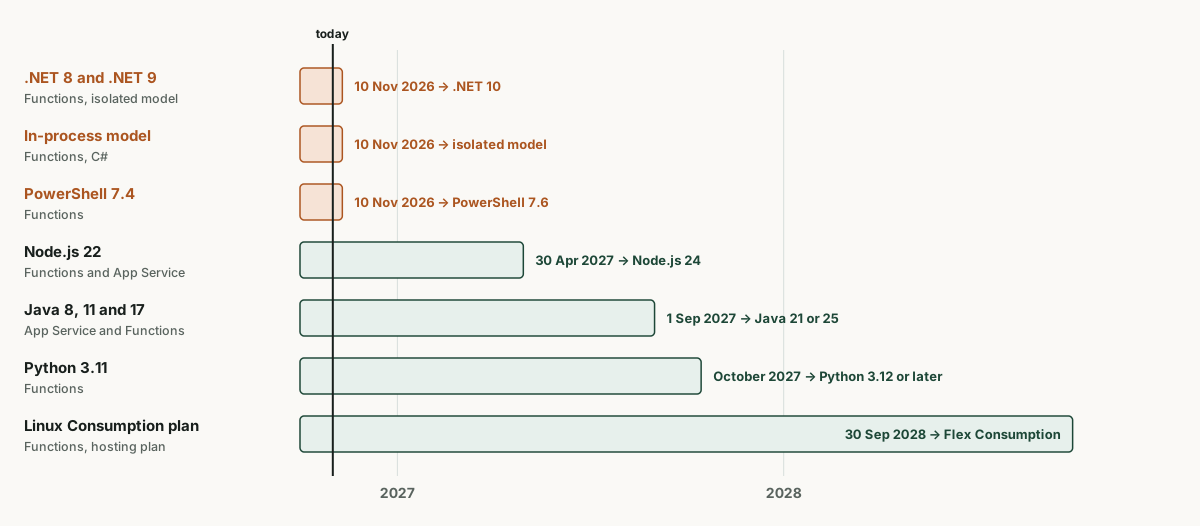
Microsoft aligns the dates with the support lifecycle of each language. .NET 9 was originally planned to end in May 2026. Because Microsoft extended support for standard term .NET releases to 24 months, .NET 9 now ends on the same day as .NET 8. The target, .NET 10, is supported until 14 November 2028.
What happens after the deadline
For Functions, Microsoft describes the process in more detail than for App Service. Apps on a retired version can still be created and deployed, and they keep running. They no longer receive security patches, bug fixes or performance improvements.
One sentence in the policy is easy to miss: if required, Microsoft will in certain cases limit the number of instances allocated to such apps, including limiting scaling to a single instance. For an app that scales out to ten instances under load, the support question becomes an availability question.
App Service puts it more briefly: the app keeps running unchanged, but there are no security patches and no support for the runtime after the deadline.
The in-process model is the biggest effort
For .NET 8 on the isolated model, moving the target to .NET 10 with updated packages and a test is usually enough. Apps on the in-process model must first be migrated to the isolated model, because the in-process model only supports .NET 8 and ends on the same day. That means changes to the project file, packages, startup code, function signatures and bindings.
Two details from the Microsoft guide matter in practice. The isolated model uses System.Text.Json instead of Newtonsoft.Json and silently ignores attributes such as [JsonProperty], so affected properties quietly receive their default value. And setting the app setting FUNCTIONS_WORKER_RUNTIME to dotnet-isolated before the new code is deployed produces error AZFD0013 until it is. Microsoft recommends a staging slot for this. The Flex Consumption plan has no slots.
Apps that depend on libraries available only on .NET Framework can target .NET Framework 4.8 on the isolated model.
Linux Consumption plan: first the plan, then the version
Apps on the Linux Consumption plan face an extra hurdle. Microsoft no longer adds new language versions there. .NET 9, Node.js 22, Python 3.12, Java 21 and PowerShell 7.4 are the last versions on that plan. For .NET 10, Node.js 24 or PowerShell 7.6 the app must first move to the Flex Consumption plan.
The Linux Consumption plan itself retires on 30 September 2028. Apps on Functions runtime v3 on that plan have, according to Microsoft, stopped running after 30 September 2026. The Consumption plan on Windows is affected by neither.
Finding affected apps
The script lists the worker model and configured versions for every function app in the current subscription. The value dotnet for FUNCTIONS_WORKER_RUNTIME means the in-process model, dotnet-isolated the isolated model.
(az functionapp list --query "[].{name:name, rg:resourceGroup}" | ConvertFrom-Json) | ForEach-Object {
  $c = az functionapp config show -n $_.name -g $_.rg | ConvertFrom-Json
  $s = az functionapp config appsettings list -n $_.name -g $_.rg | ConvertFrom-Json
  [pscustomobject]@{
    App        = $_.name
    Worker     = ($s | Where-Object name -eq 'FUNCTIONS_WORKER_RUNTIME').value
    Linux      = $c.linuxFxVersion
    DotNet     = $c.netFrameworkVersion
    PowerShell = $c.powerShellVersion
    Node       = ($s | Where-Object name -eq 'WEBSITE_NODE_DEFAULT_VERSION').value
  }
} | Format-Table
For Linux apps linuxFxVersion is the relevant value, for Windows apps netFrameworkVersion. The Reader role is not sufficient to read app settings. For App Service web apps, az webapp list and az webapp config show return the same information.
The reminders often reach the wrong people
App Service sends notices about expiring runtimes to the classic roles account administrator, service administrator and co-administrator. Contributors and readers only receive them if they are included through Service Health alerts. In environments that rely on Azure RBAC alone, the emails easily end up with people who do not look after the app. A Service Health alert to the responsible teams closes that gap.
What I would check before 10 November
- Every function app with FUNCTIONS_WORKER_RUNTIME set to dotnet: it needs the migration to the isolated model, a version change alone is not enough.
- Apps on the Linux Consumption plan: first the move to Flex Consumption, then the new version.
- CI/CD pipelines and infrastructure templates that pin runtime and version. Otherwise the next deployment restores the old state.
- A staging slot for every production app that can have one. The change restarts the app, according to Microsoft typically for 30 to 60 seconds.
How to plan the upgrade
An architecture review records every function app and web app with runtime, hosting plan and deployment path and sets the order: first what expires on 10 November, then Node.js and Java in 2027. Your team or service provider makes the changes, the review provides the list to work from.
All dates at a glance: Azure deadline calendar 2026 to 2029
Frequently asked questions
Do Azure Functions on .NET 8 stop running on 10 November?
No. The apps keep running but no longer receive security updates or support. Microsoft reserves the right to limit scaling of such apps to a single instance in certain cases.
Is it enough to set the .NET version to 10 in the portal?
Only on the isolated model, and only after the code has been rebuilt with .NET 10 and deployed. Apps on the in-process model must be migrated first.
Does the date also apply to .NET on App Service?
According to the .NET support policy, support for .NET 8 and .NET 9 ends on 10 November 2026. App Service follows the language support timelines and provides neither security patches nor support for these versions afterwards.
What about Java 8, 11 and 17?
On App Service, support ends on 1 September 2027, on Functions according to Microsoft in September 2027. For App Service, Microsoft names Java 25 as the target, Functions supports Java 21 and 25.
Sources (as of 1 November 2026)
- Azure Update 572838: support for .NET 8 and .NET 9 in Azure Functions ends on 10 November 2026
- Microsoft Learn: Supported languages in Azure Functions
- Microsoft Learn: Azure Functions language stack support policy
- Microsoft Learn: Migrate C# apps from the in-process model to the isolated worker model
- Microsoft Learn: Update language versions in Azure Functions
- Microsoft Learn: Language runtime support policy, Azure App Service
- Azure Update 567334: support for Node 22 LTS in App Service ends on 30 April 2027
- Azure Update 568585: support for Java 8, 11 and 17 in App Service ends on 1 September 2027
- Microsoft: .NET and .NET Core Support Policy