Since October 2026, Azure Site Recovery for Azure Local has been generally available. VMs on an Azure Local cluster can be replicated continuously to Azure, started there in an emergency and later brought back to your own site.
For many mid-sized companies running Azure Local, this is the first disaster recovery outside their own server room. Before setting it up, three questions are worth asking: where does the copy live, what does it cost in normal operation, and is the line fast enough for the first transfer?
How replication, testing and return fit together
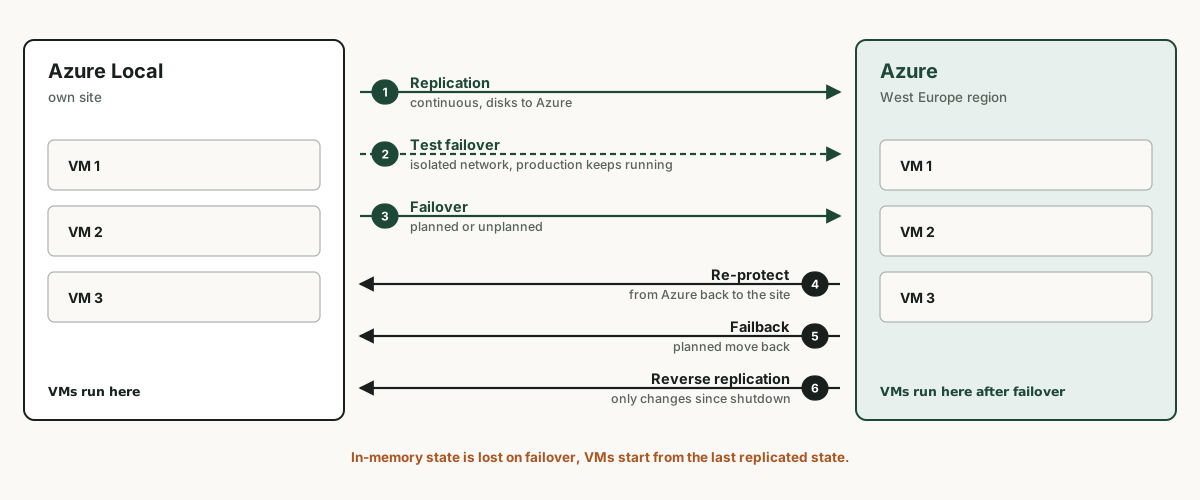
The disks of protected VMs are replicated continuously to a storage account in Azure. A test failover starts copies in an isolated network without interrupting replication. In an emergency the VMs keep running in Azure, and later they are replicated back to the site and switched back in a planned failback.
Windows and Linux VMs of generation 1 and 2 are supported. Setup starts in the portal on the Azure Local resource, where a wizard creates the vault, Hyper-V site and replication policy and installs the agent on every node. New with general availability are proxy settings in the wizard and support for Application Control (WDAC) in enforced mode.
The copy lives in the Netherlands
Azure Local is registered in an Azure region. In Europe, the only option is West Europe, the region in the Netherlands. Microsoft requires the Recovery Services vault to be in the same region the instance is registered in, and that is also where the storage account and replicas are created.
For a cluster in Vienna or Munich, this means the disaster recovery copy and the VMs after a failover live in West Europe, not in Austria East or Germany West Central. That stays within the EU. Anyone with requirements to keep data in their own country has to settle this before setup, not afterwards.
It matters for cost as well: West Europe is one of the regions where Microsoft raises prices for specific VM series and storage from 1 February 2027.
More on this: The 2027 price adjustment: why I still advise moving off Bv1
Running cost and cost in an emergency
| Item | Price per US list | When it applies |
|---|---|---|
| Protection per VM | 25 USD a month, first 31 days free per VM | ongoing, based on the average number of protected VMs |
| Storage for replicas | by disk size and type | ongoing |
| Compute for VMs in Azure | price of the chosen VM size | only during test failover and after a failover |
For 15 protected VMs, that comes to 375 US dollars a month for protection alone, plus storage. Compute only costs money while VMs run in Azure. A one-day test failover therefore creates measurable but limited cost, and it should still be budgeted for.
Bandwidth for the first transfer
According to Microsoft, Azure Local itself gets by with 10 Mbit/s for synchronisation. That is not enough to replicate whole VMs. The first transfer copies every disk in full, after that only changes.
A rough calculation: 4 TB of disks take about 89 hours at a fully used 100 Mbit/s, and about 37 days at 10 Mbit/s. In practice the line is never fully available. Microsoft provides its own capacity planning tool for this.
In the Microsoft example, the policy replicates every 5 minutes and keeps recovery points for 2 hours. The interval determines how much data is missing at most in an emergency, the retention how far back you can go.
What works differently in Azure
- Extensions installed through Azure Arc cannot be managed on the VM in Azure. Guest Configuration policies only run again after the return.
- Logs from Monitor, Defender and Sentinel are tied to the Azure VM while it runs in Azure, the history to the Arc resource. Searching by resource ID shows only part of it each time.
- Microsoft advises against installing the Azure VM guest agent if the VM is meant to go back on-premises. It can conflict with the Arc extensions.
- VMs with Trusted Launch are not supported yet, Microsoft has announced this for a later release.
- The nodes need internet access to Azure, directly or through a proxy.
To settle before setup
- Whether West Europe as the storage location fits your own requirements.
- Which network the VMs get in Azure, isolated for tests and connected to users and sites for a real event.
- How name resolution and sign-in work in Azure when the site is down, and which VM has to start first. Recovery plans define that order.
- Whether the line can handle the initial replication in a reasonable time.
- Who gets the Owner role on the vault. Without it, preparation fails.
Rehearsing the recovery properly once
Replication without a tested recovery is a promise without proof. An architecture review checks storage location, network, name resolution and start order and plans the first test failover so that it actually tells you something. Your team runs the exercise, the review provides the runbook and the assessment.
Frequently asked questions
What does Azure Site Recovery for Azure Local cost?
According to the US price list, 25 US dollars per protected VM per month, with the first 31 days free per VM. Storage for replicas comes on top, plus compute while VMs run in Azure.
Which Azure region does Azure Local replicate to in Europe?
In Europe, Azure Local can only be registered in West Europe, and the vault has to be in the same region. The replicas therefore live in the Netherlands.
Is data lost during failover?
The VM starts from the last replicated state, and in-memory state is lost. How much is missing depends on the replication interval in the policy.
Can I go back to Azure Local after the emergency?
Yes. The VMs are replicated back from Azure and switched back in a planned failback, to the same or a different host. Replication to Azure then resumes with only the changes since shutdown.
Sources (as of 3 November 2026)
- Azure Update 579111: Generally Available: Azure Site Recovery for Azure Local
- Microsoft Learn: Protect your Hyper-V virtual machine workloads on Azure Local with Azure Site Recovery
- Microsoft Tech Community: Azure Site Recovery for Azure Local Is Now Generally Available (5 Oct 2026)
- Microsoft: Azure Site Recovery pricing (retrieved 3 Nov 2026)
- Microsoft Learn: System requirements for Azure Local, supported Azure regions
- Microsoft Learn: Set up Hyper-V disaster recovery by using Azure Site Recovery, replication policy